Bridge asset hierarchy template
A worked example of a bridge asset hierarchy: 16 classes in 4 levels, 21 data points and 14 decisions, each linked to the lifecycle stage it supports. It's a starting point built on general industry practice, not on any organization's real data.
Opens as your own editable copy. Nothing to sign up for.
- classes
- 16
- levels
- 4
- data points
- 21
- decisions
- 14
- lifecycle stages
- 6
The levels
4 levels, from the whole network down to the part you maintain. Rename them to suit.
| Level | What it holds |
|---|---|
| 1. Portfolio | Every structure the owner is responsible for. Holds the data points every bridge shares. |
| 2. Bridge type | Bridges that share a structural form, and so an inspection approach. |
| 3. Structural element | The deck, superstructure and substructure: the units condition is rated on. |
| 4. Element part | A member or part inspected and repaired on its own. |
The full class outline
Every class, with the data points it defines in italics. A class passes its data points to everything beneath it.
- Bridge portfolioEvery bridge and culvert an owner is responsible for.the shared data points below
- Girder bridgeSteel or concrete beams supporting a deck.
- DeckThe riding surface and slab.Deck condition rating
- Wearing surfaceOverlay on the deck.
- Expansion jointLets the deck move with temperature.Joint leakage
- RailingBarriers at the deck edge.
- SuperstructureGirders and bearings.Superstructure condition rating
- GirderPrimary beam.Section loss
- BearingTransfers loads to the substructure.
- SubstructurePiers, abutments and foundations.Substructure condition rating
- PierIntermediate support.
- AbutmentEnd support.
- FoundationFootings and piles.Scour critical
- DeckThe riding surface and slab.Deck condition rating
- Truss bridgeLoad carried by a framework of members.Fracture-critical
- Arch bridgeLoad carried in compression through an arch.
- CulvertBuried structure carrying water under a road.Culvert condition rating
- Girder bridgeSteel or concrete beams supporting a deck.
The shared data points
13 data points defined once, on Bridge portfolio, and inherited by every class. Each one carries a reason: the decisions it feeds.
| Data point | Type | Feeds decisions |
|---|---|---|
| Install dateStarts the asset's life clock. Age, remaining life and renewal timing are all calculated from it. | date | As-built acceptance, Long-term financial forecast |
| AgeGroups assets by vintage for inspection planning and replacement forecasting. | number · years | Inspection frequency, Long-term financial forecast, Retire or abandon |
| Expected useful lifeThe design or industry life for this class. Sets when renewal should be planned. | number · years | Long-term financial forecast, Capital renewal program |
| Remaining useful lifeHow long the asset can keep serving. The basis for the renewal year and the repair-or-replace call. | number · years | Capital renewal program, Repair, rehabilitate or replace |
| Condition scoreMeasured physical state, 1 (very good) to 5 (very poor). Drives inspection, maintenance and renewal decisions. | number · 1–5 | Inspection frequency, Maintenance strategy, Repair, rehabilitate or replace, Retire or abandon |
| Likelihood of failureHow likely the asset is to fail, from condition, age and failure history. Half of the risk score. | number · 1–5 | Risk ranking |
| Consequence of failureHow much a failure would cost in safety, service, environment and money. The other half of the risk score. | number · 1–5 | Risk ranking, Inspection frequency, Maintenance strategy |
| Risk scoreLikelihood times consequence. Ranks assets so money goes to the highest risk first. | number · LoF × CoF | Risk ranking, Capital renewal program, Repair, rehabilitate or replace, Retire or abandon |
| Replacement costWhat it would cost to replace today. Feeds the capital plan and the long-term forecast. | number · $ | Capital renewal program, Long-term financial forecast, Repair, rehabilitate or replace |
| Planned rehab / replace yearThe year renewal is planned. Turns risk and remaining life into a schedule and a budget. | number · year | Capital renewal program, Long-term financial forecast |
| PM / CM ratioShare of maintenance hours that were planned rather than reactive. Shows whether the maintenance strategy is working. | number · % | Maintenance strategy |
| Average daily trafficWeights consequence of failure and closure impact. | number · vehicles/day | Risk ranking, Bridge replacement priority |
| Load ratingWhat the bridge can safely carry; drives posting. | number · tons | Load posting, Bridge replacement priority, Design standards |
The decisions, and the lifecycle stages they sit in
9 decisions are shared by every template and 5 are specific to this one. The lifecycle runs Plan, Create, Operate, Maintain, Renew and Dispose.
| Decision | Stages | Kind |
|---|---|---|
| Risk ranking | Plan › Needs assessment | Shared |
| Capital renewal program | Plan › Capital planning, Renew › Replace | Shared |
| Long-term financial forecast | Plan › Capital planning | Shared |
| Design standards | Create › Design | Shared |
| As-built acceptance | Create › Construct | Shared |
| Inspection frequency | Operate › Inspect | Shared |
| Maintenance strategy | Maintain › Preventive | Shared |
| Repair, rehabilitate or replace | Maintain › Corrective, Renew › Rehabilitate, Renew › Replace | Shared |
| Retire or abandon | Dispose › Decommission | Shared |
| Inspection interval | Operate › Inspect | Industry |
| Load posting | Operate › Monitor | Industry |
| Deck preservation | Maintain › Preventive, Renew › Rehabilitate | Industry |
| Scour countermeasures | Maintain › Corrective | Industry |
| Bridge replacement priority | Plan › Needs assessment, Renew › Replace | Industry |
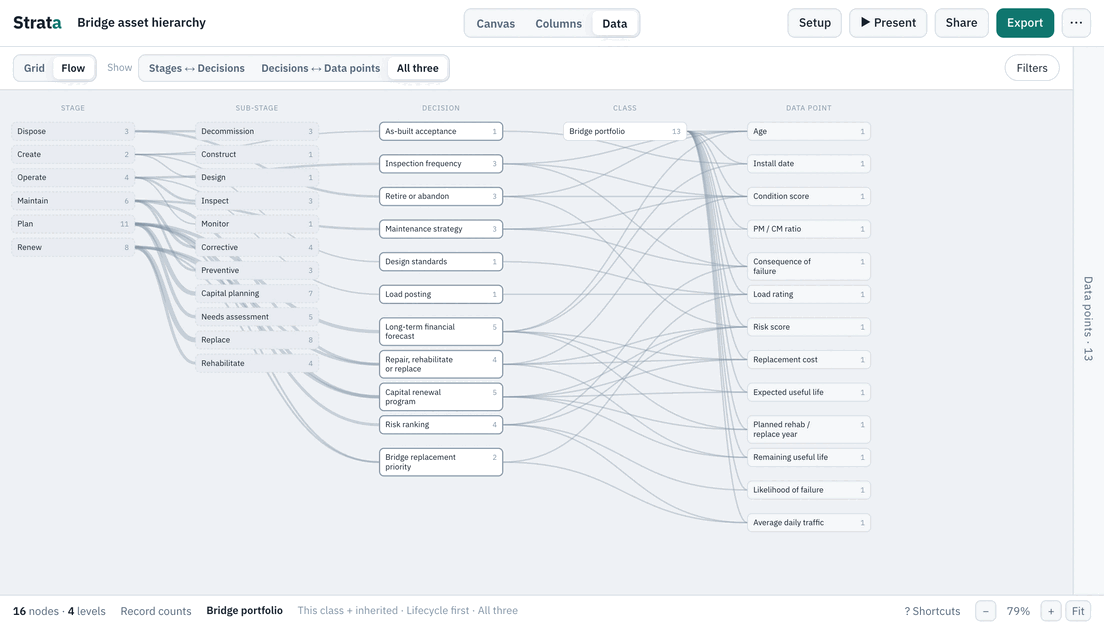
The Flow map
The same template as a Flow map: lifecycle stages, the decisions made in them and the data points each one needs.
How to make it yours
- 01
Rename the levels
Open Setup › Levels and call each level what your organization calls it.
- 02
Add your classes
Add the classes you have that the template does not, or import your own list from Excel. Anything you add inherits the shared data points from its parent.
- 03
Link your own decisions
Open Setup › Decisions to change which decisions each data point feeds and which lifecycle stages they sit in. Gaps are counted for you.
Open the bridge template and make it yours.
Opens as your own editable copy. Nothing to sign up for.