Data Center asset hierarchy template
A worked example of a data center asset hierarchy: 24 classes in 4 levels, 21 data points and 14 decisions, each linked to the lifecycle stage it supports. It's a starting point built on general industry practice, not on any organization's real data.
Opens as your own editable copy. Nothing to sign up for.
- classes
- 24
- levels
- 4
- data points
- 21
- decisions
- 14
- lifecycle stages
- 6
The levels
4 levels, from the whole network down to the part you maintain. Rename them to suit.
| Level | What it holds |
|---|---|
| 1. Site | The whole facility. Holds the data points every asset shares. |
| 2. Infrastructure system | Electrical, mechanical, safety or white space: systems designed and run as one. |
| 3. Equipment | Equipment alike enough to share a design life, a maintenance regime and a cost model. |
| 4. Component | A part that is inspected, maintained or replaced on its own schedule. |
The full class outline
Every class, with the data points it defines in italics. A class passes its data points to everything beneath it.
- Data center siteA facility's power, cooling, safety and white-space infrastructure.the shared data points below
- ElectricalPower from the utility to the rack.Rated capacity, Peak load
- Utility switchgearReceives utility power.
- GeneratorStandby power.Run hours
- Fuel systemTanks and day tanks.Fuel autonomy
- Automatic transfer switchSwitches load to the generator.
- UPSUninterruptible power supply.
- Battery stringStored energy for ride-through.Internal resistance trend
- Power distribution unitDistributes power to racks.
- MechanicalCooling for white space.Cooling capacity
- ChillerProduces chilled water.Efficiency
- Cooling towerRejects heat outdoors.
- CRAH unitComputer-room air handler.
- PumpMoves chilled and condenser water.
- Fire and life safetyDetection and suppression.
- Detection systemSmoke and early-warning detection.
- Suppression systemClean agent or pre-action sprinklers.Last test date
- White spaceWhere IT equipment sits.
- Data hallA room of racks.Rack power density
- RackEquipment cabinet.
- ContainmentHot or cold aisle containment.
- Data hallA room of racks.Rack power density
- Building and controlsShell and monitoring.
- Building management systemMonitors and controls facility systems.
- Security systemAccess control and CCTV.
- ElectricalPower from the utility to the rack.Rated capacity, Peak load
The shared data points
12 data points defined once, on Data center site, and inherited by every class. Each one carries a reason: the decisions it feeds.
| Data point | Type | Feeds decisions |
|---|---|---|
| Install dateStarts the asset's life clock. Age, remaining life and renewal timing are all calculated from it. | date | As-built acceptance, Long-term financial forecast |
| AgeGroups assets by vintage for inspection planning and replacement forecasting. | number · years | Inspection frequency, Long-term financial forecast, Retire or abandon |
| Expected useful lifeThe design or industry life for this class. Sets when renewal should be planned. | number · years | Long-term financial forecast, Capital renewal program |
| Remaining useful lifeHow long the asset can keep serving. The basis for the renewal year and the repair-or-replace call. | number · years | Capital renewal program, Repair, rehabilitate or replace |
| Condition scoreMeasured physical state, 1 (very good) to 5 (very poor). Drives inspection, maintenance and renewal decisions. | number · 1–5 | Inspection frequency, Maintenance strategy, Repair, rehabilitate or replace, Retire or abandon |
| Likelihood of failureHow likely the asset is to fail, from condition, age and failure history. Half of the risk score. | number · 1–5 | Risk ranking |
| Consequence of failureHow much a failure would cost in safety, service, environment and money. The other half of the risk score. | number · 1–5 | Risk ranking, Inspection frequency, Maintenance strategy |
| Risk scoreLikelihood times consequence. Ranks assets so money goes to the highest risk first. | number · LoF × CoF | Risk ranking, Capital renewal program, Repair, rehabilitate or replace, Retire or abandon |
| Replacement costWhat it would cost to replace today. Feeds the capital plan and the long-term forecast. | number · $ | Capital renewal program, Long-term financial forecast, Repair, rehabilitate or replace |
| Planned rehab / replace yearThe year renewal is planned. Turns risk and remaining life into a schedule and a budget. | number · year | Capital renewal program, Long-term financial forecast |
| PM / CM ratioShare of maintenance hours that were planned rather than reactive. Shows whether the maintenance strategy is working. | number · % | Maintenance strategy |
| Redundancy levelN, N+1 or 2N: how many failures a system can absorb without downtime. | enum | Redundancy verification, Design standards, Capacity planning |
The decisions, and the lifecycle stages they sit in
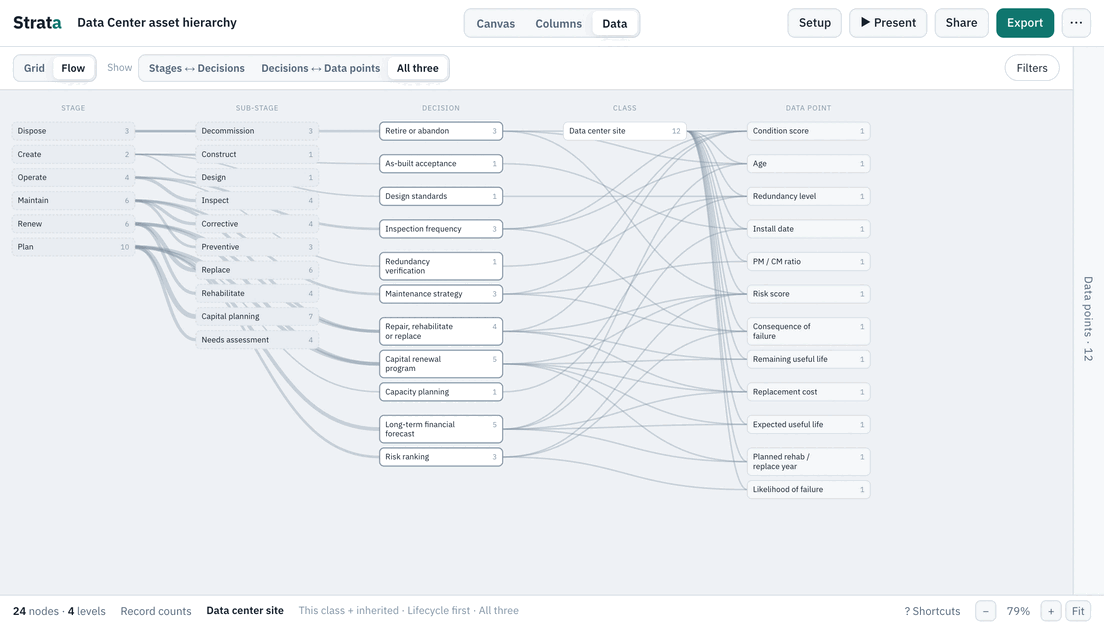
9 decisions are shared by every template and 5 are specific to this one. The lifecycle runs Plan, Create, Operate, Maintain, Renew and Dispose.
| Decision | Stages | Kind |
|---|---|---|
| Risk ranking | Plan › Needs assessment | Shared |
| Capital renewal program | Plan › Capital planning, Renew › Replace | Shared |
| Long-term financial forecast | Plan › Capital planning | Shared |
| Design standards | Create › Design | Shared |
| As-built acceptance | Create › Construct | Shared |
| Inspection frequency | Operate › Inspect | Shared |
| Maintenance strategy | Maintain › Preventive | Shared |
| Repair, rehabilitate or replace | Maintain › Corrective, Renew › Rehabilitate, Renew › Replace | Shared |
| Retire or abandon | Dispose › Decommission | Shared |
| Capacity planning | Plan › Needs assessment | Industry |
| Redundancy verification | Operate › Inspect | Industry |
| Battery replacement | Renew › Replace | Industry |
| Cooling efficiency tuning | Operate › Monitor | Industry |
| Generator load testing | Maintain › Preventive | Industry |
The Flow map
The same template as a Flow map: lifecycle stages, the decisions made in them and the data points each one needs.
How to make it yours
- 01
Rename the levels
Open Setup › Levels and call each level what your organization calls it.
- 02
Add your classes
Add the classes you have that the template does not, or import your own list from Excel. Anything you add inherits the shared data points from its parent.
- 03
Link your own decisions
Open Setup › Decisions to change which decisions each data point feeds and which lifecycle stages they sit in. Gaps are counted for you.
Open the data center template and make it yours.
Opens as your own editable copy. Nothing to sign up for.