Utility Network or Trimble Unity migration: inventory your fields first
A utility network migration is the one time every feature class and field gets questioned. Whether the target is the ArcGIS Utility Network or a Trimble Unity migration, use it to decide what earns a place in the new model and where each piece of data should live.
Published 2026-10-09 · Theory only: general industry knowledge, no client data.
What this covers, and what it does not
ArcGIS and ArcMap are Esri’s, and Cityworks and Trimble Unity are Trimble’s. The names belong to their owners, appear here only so you can tell what this guide is about, and Strata is not affiliated with any of them.
Many utilities are moving off older GIS setups. Esri retired ArcMap in March 2026, and data held in a geometric network has to be mapped onto the Utility Network model, which Esri documents with tools built around asset packages and a mapping workbook. Trimble now markets the product it sold as Cityworks AMS as Trimble Unity Maintain, and it is built on the ArcGIS geodatabase, so the two projects often share a data model. Check each vendor’s current documentation, because these products change.
This is not a migration manual. Strata does not connect to a GIS, does not convert schemas, does not migrate data and does not hold features. It is where you decide what the new model should contain before the migration team starts. The terms are practical ones: feature class, field, domain, consequence of failure.
Why migrations carry clutter forward
A migration is the one time every feature class and field gets questioned. It rarely happens that way. The deadline is tight, the old schema is the only specification anyone has, and nobody can say why half the fields exist. So they get copied across. Picture a legacy layer with several fields that all hold pole material and a manufacturer spelled four ways. All of it arrives intact in a model that was meant to be clean.
The fix is to inventory before the vendor starts, and to make every field earn its place. The inventory should answer three questions. What is this kind of thing? What do we record about it? Why?
Build the asset classes once
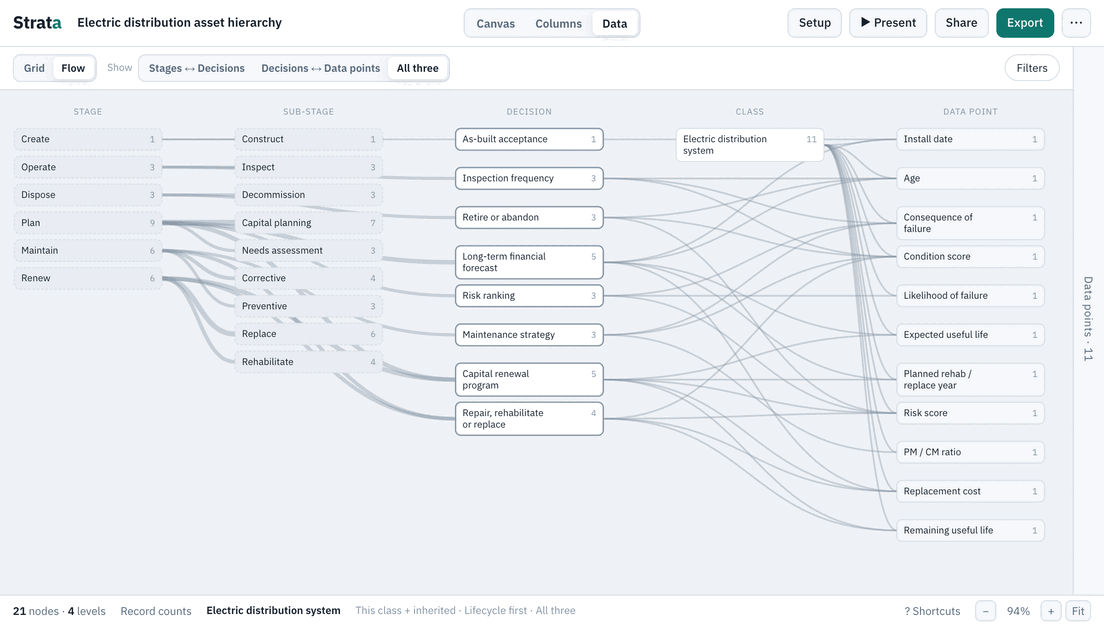
In Strata you build the classes as a tree and define each field once, on the highest class where it applies. Everything beneath inherits it. In the Electric distribution template, Pole sits under Overhead lines and defines Pole material and Remaining strength. It inherits install date, condition score and the other shared data points from the top of the tree. A field that applies to every pole is defined on Pole once. It is not repeated for each pole type.
| In Strata | Roughly, in a GIS model |
|---|---|
| Class | A feature class, or an asset group or type within one |
| Data point | A field |
| A data point typed as a list of values | A field with a domain. The allowed values stay in the GIS. |
| Purpose, and the decisions it feeds | Nothing. Schemas rarely say why a field exists. |
How your classes map onto feature classes and asset types is a modeling choice for the migration team. The point of the inventory is that they get a clean, agreed list to model from.
Give every field a purpose
Strata asks for one when you add a data point, and Setup, Levels also has an ArcGIS / UN column where you can note what each level becomes in the new model. The template gives Pole material the purpose “Material sets life expectancy and inspection method.” and Remaining strength “From inspection; poles below threshold must be replaced or reinforced.”. Each one also says which decision it feeds. A field you cannot give a purpose is a candidate to drop, and each one you drop is a column you do not migrate, test or maintain.
Look for fields that duplicate something the new model derives. Circuit ID sits on Overhead lines to tie assets to a circuit for reliability reporting. In a network model, circuit membership may come from the network itself, not from a hand-typed field. Ask your GIS lead whether the field still earns its place. That conversation is much shorter when the purpose is written down.
Decide where each piece should live
Every data point carries a Current system and a Desired system, the names of where it is saved today and where it should be. When they differ, the data point shows “Moves: A → B”, and the “Needs to move” filter turns those into a list. The PowerPoint export includes the same list as a migration table. Here is an invented example, with generic systems, built on four data points from the template.
| Data point | Current system | Desired system |
|---|---|---|
| Remaining strength | Inspection reports | Work management system |
| Circuit ID | Legacy GIS | New GIS |
| Pole material | Legacy GIS | New GIS |
| Peak loading | Spreadsheets | Asset management system |
All four move, but they are different jobs. Two pull data out of reports and spreadsheets into a system of record, and two carry GIS fields across. The point of the list is to see that a migration is several jobs, and the vendor needs to know which is which.
Hand the inventory to the migration team
Export the attributes as CSV, with each data point’s class, purpose, type, unit, current and desired system and the decisions it feeds, plus the nodes CSV for the class tree and a JSON file. That is a specification the migration team can read, and it records the reasoning behind every field. They map it to their own schema with their own tools. Keep a named version of what was agreed, so “which inventory did we sign off?” has an answer.
To try it, open the electric distribution template and set the systems on a few data points. The guide on taking a hierarchy into your systems covers what to agree before loading, and the digital master plan guide shows how the same current-to-desired view fits a wider plan.
Related guides
- What is an asset hierarchy? The pillar: levels, classes and instances, common patterns, and the mistakes to avoid.
- Digital master plan: asset data Put the hierarchy and data standard in the plan, with a current-to-desired view.
- Hierarchy, EAM, CMMS and GIS Taking an agreed hierarchy into the systems, and keeping them aligned.
- Asset data glossary Plain definitions of the terms the templates use.