Digital master plan: the asset data foundation
Most IT and digital master plans inventory systems. Fewer define the asset data those systems share. This guide covers why the hierarchy and data standard belong in the plan, and how to show the path from current systems to desired ones.
Published 2026-10-09 · Theory only: general industry knowledge, no client data.
What most plans inventory, and what they skip
An IT or digital master plan usually starts with an inventory: which systems exist, who runs them, what they cost, when they reach end of life. You need that list. But it describes the systems, and it rarely describes what they share. That is the asset data underneath: what the organization calls each kind of asset, what it records about each one, and which system may change which value.
Without it, each new system is configured by its own team with its own classes and fields, and the roadmap carries the disagreements forward. This guide is for staff writing a plan or an RFP, and for whoever responds to one. It names no agency and no particular solicitation.
Why the hierarchy and data standard belong in the plan
- Every system depends on it. Asset management, mapping, work management, finance and analytics all need to agree what an asset is, and a shared hierarchy is the cheapest way to get there.
- It sets the order of work. You cannot sequence a migration without knowing which data points exist, where they live and where they should go.
- It makes procurement comparable. Respondents price against a defined standard instead of each assuming their own.
- It outlives the products. Systems get replaced, and a documented standard moves to the next one. The guide on EAM, CMMS and GIS shows how it is loaded into each.
What the plan should contain
| The plan says | Where Strata holds it |
|---|---|
| The agreed classes and levels | The hierarchy |
| What is recorded about each class, with units and values | Data points, inherited down the tree |
| Why each is needed | Purpose, decisions and lifecycle stages |
| Where each lives now and where it should live | Current system and Desired system |
| What is in good shape today | Current state |
The model cannot hold governance for you, so add it to the plan: who may change the standard, how a change is approved and how often it is reviewed.
From current to desired: the Moves list
Every data point in Strata carries two fields. Current system is where it is collected and saved today. Desired system is where it should live. When the two differ, the data point shows a “Moves” marker, and the PowerPoint export gathers them into a migration table that counts data points by where they come from and where they go. Both terms are in the glossary.
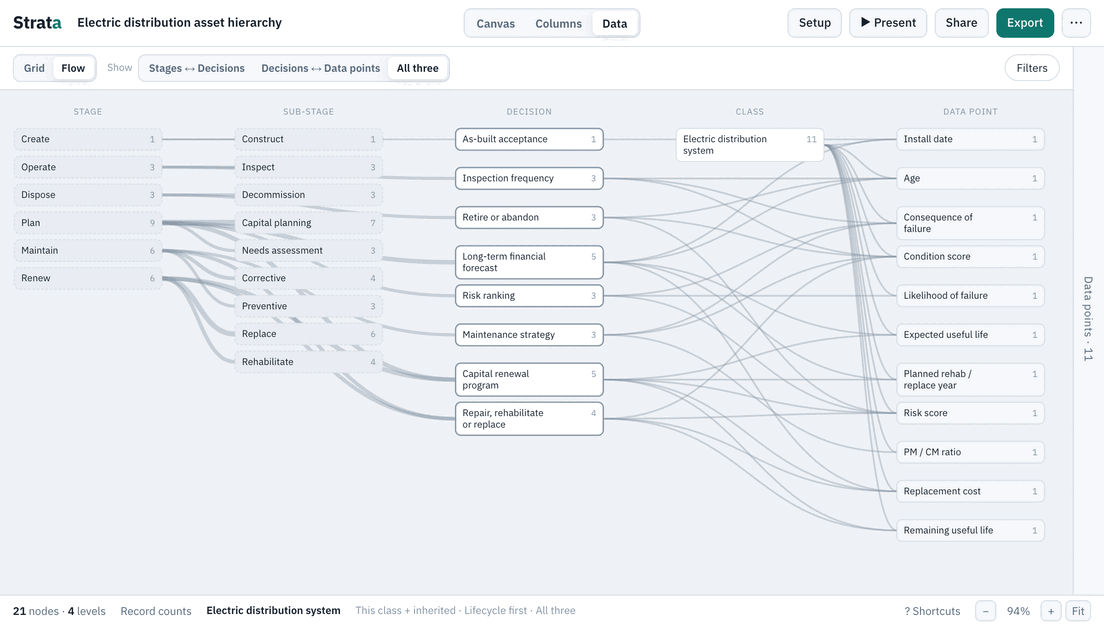
That table is a roadmap in miniature. Below is an invented example built on four data points from the Electric distribution template. The systems are generic, and nothing here describes a real organization.
| Data point | Current system | Desired system |
|---|---|---|
| Peak loading | Operations historian | Asset management system |
| Last trim date | Contractor spreadsheets | Work management system |
| Remaining strength | Inspection reports | Asset management system |
| Pole material | Contractor spreadsheets | Asset management system |
Gathered into the migration list it reads: one data point moves from contractor spreadsheets to the work management system; one data point moves from contractor spreadsheets to the asset management system; one data point moves from inspection reports to the asset management system; one data point moves from operations historian to the asset management system. Each line is a work package a plan can name, size and schedule. Data points whose two fields match need no move; they are already where they belong.
Decisions as the business case for each system
Plans often struggle to justify a system in terms leadership recognizes. Decisions help. In the template, Transformer loading review needs Peak loading, a reading in % that is calculated and Sensor / SCADA, and its purpose is recorded: overloaded units fail early. Whichever system is meant to hold that reading now has a reason a manager can read: it supports a named decision.
The logic runs both ways.
- A system with no decision behind it is a cost to question. If nothing it holds feeds a decision, ask what it is for.
- A decision with no system behind it is a gap to fund. If the data it needs lives in no system, or in a spreadsheet, that is a project.
- A data point that feeds no decision is a candidate for retirement, which shrinks the migration.
The guide on leadership questions describes how to gather the decisions in the first place.
A living appendix
A master plan is adopted once and read for years, while the standard underneath it keeps changing. A printed appendix is stale the day it goes to the printer. A Strata share link can stand in for it. The plan cites the link, readers open the current version in a browser with nothing to install, and the people who maintain the standard publish a new version when it changes. Versions are named and dated, so the plan can say which one it was adopted against.
Two cautions. A link is protected by a view password, so the plan should say how to request access. And if the plan needs a fixed record, attach the PowerPoint or JSON export of the adopted version, because an export does not change.
For the solicitation, and for the response
If you are writing one, ask for the asset data foundation by name: the hierarchy, the data standard, the system-of-record decisions and the migration list. Say whether you already have a draft and will supply it, or whether the work includes creating it. Ask how the response will keep the standard current after delivery.
If you are answering one, show the foundation first and the systems second. A response that states which decisions the data supports, and where each data point lives today and should live, is a plan the agency can verify. Start from the template closest to the agency’s industry and adapt it, for instance the electric distribution template. Strata describes the standard and does not store records, so it sits alongside whichever systems the plan selects.
Related guides
- What is an asset hierarchy? The pillar: levels, classes and instances, common patterns, and the mistakes to avoid.
- Hierarchy, EAM, CMMS and GIS Taking an agreed hierarchy into the systems, and keeping them aligned.
- Can your EAM data answer leadership? Start from the questions leadership asks and check the data behind each.
- Is your asset data ready for AI? Why context, not just columns, decides the quality of an answer.
- Asset data glossary Plain definitions of the terms the templates use.